
Introduction: A Tablet That Grows With Your Child — Without the Worry
In a world flooded with screen time — from homework to games to video calls — parents want a tablet that’s more than just a mini-computer. They want a device that’s safe, sturdy, educational, and easy to control. Enter the Amazon Fire HD 10 Kids Pro: a full-size tablet built specifically for kids aged 6–12, offering parental controls, kid-friendly content, and robust hardware to handle modern apps and games. But does it truly deliver on all fronts — is it smooth enough, safe enough, and durable enough for everyday life? In this review, we dissect it all: from display, speed, and battery, to parental controls, user experience, and real-world downsides.
What Is the Fire HD 10 Kids Pro?
The Fire HD 10 Kids Pro is a full-size 10.1-inch tablet designed especially for kids roughly between ages 6 to 12. Unlike “toy tablets,” this is a fully functional slate — but wrapped in kid-friendly software and protections: a sturdy slim case, content filters, parent dashboards, and a one-year subscription to kid-safe content that includes books, videos, games, and educational apps. Once the free subscription ends, you can continue or revert to the regular adult interface, making it a device that can grow as your child matures.
Key Specifications at a Glance
| Feature | Spec / Detail |
|---|---|
| Display | 10.1″ Full HD (1920 × 1200), 224 ppi — vivid, crisp images for video, reading, games |
| Processor & Memory | Octa-core chip + 3 GB RAM — smooth operation for apps, media, multitasking |
| Storage | 32 GB internal (expandable up to 1 TB via microSD) — enough for videos, games, books |
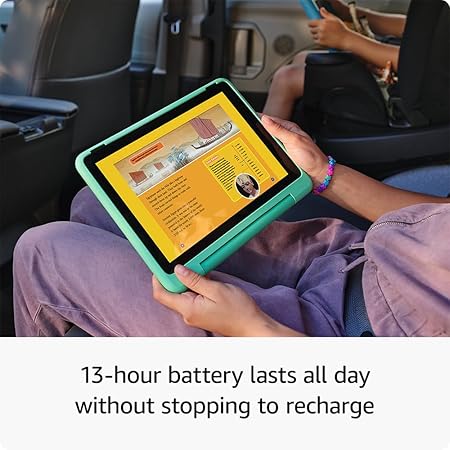
| Battery Life | Up to 12–13 hours on single charge — lasts through a full day of use |
| Operating System | Fire OS with kids-friendly interface, parental controls, child profiles |
| Build & Durability | Slim, sturdy kid-case + 2-year worry-free guarantee — protects against drops/spills |
| Audio & Cameras | Dual stereo speakers, microphone, front & rear cameras — good for video calls, creativity |
| Connectivity | Dual-band Wi-Fi, Bluetooth — enough for streaming, browsing, apps |
Real-World Performance & Experience
✅ Smooth for Kids’ Daily Use
For browsing, watching videos, playing casual games or educational apps, the Fire HD 10 Kids Pro performs reliably. The interface feels responsive, and the 3 GB RAM ensures that switching between apps, streaming, and light multitasking remains smooth. For games or apps designed for older kids, it handles them decently, though it’s not meant for heavy-duty gaming.
✅ A Big, Bright Screen — Perfect for Media & Learning
The 10.1″ Full HD display delivers crisp, vibrant visuals — ideal for cartoons, educational videos, reading e-books, or creative drawing apps. It’s large enough that kids don’t squint, and the resolution keeps colors and details sharp.
✅ Excellent Battery Life & Portability
With up to 12–13 hours of battery life, the tablet easily lasts a full day of schoolwork, gaming, or travel entertainment. That means fewer mid-day charging hassles and more uninterrupted fun and learning time.
✅ Kid-Friendly Software & Parental Control Features
The built-in parental controls let parents:
- Set screen time limits
- Approve or block apps and downloads
- Manage content access and filter web browsing
- Switch between “kid mode” and “adult mode” when the child grows
This gives peace of mind that kids get safe, age-appropriate content, while parents retain oversight.
✅ Durable Design Built for Kids
The included protective case and 2-year “worry-free” guarantee offer peace of mind — the tablet can survive drops or rough handling common with younger users. That makes it more reliable than handing kids a regular, fragile tablet.
Where It Falls Short — Real Drawbacks to Know
- ⚠ Limited App Store: The Fire OS ecosystem doesn’t support Google Play Store, so some popular apps may be unavailable. This limits availability for certain games or tools.
- ⚠ Not Powerful Enough for Heavy Gaming or Performance-Heavy Apps: The hardware is fine for everyday use, but not suitable for intensive gaming or heavy creative tasks.
- ⚠ SD Expansion May Be Limited in Child Profiles: Some users report microSD storage not working properly under kids’ profiles, which could limit extra storage use until profile is switched.
- ⚠ Potential Long-Term Use Limitations: As kids grow older and demand more power or apps, this tablet may feel underpowered compared to mainstream family tablets or iPads.
How to Set It Up & Use: Simple Steps
- Unbox the tablet — it comes with protective case, charger, and quick-start guide.
- Power on and follow on-screen prompts to create a child profile (age 6–12).
- Activate the included one-year subscription to kid-safe content (books, games, videos).
- Use parental controls to set screen time, filter content or manage app downloads.
- If you want more storage — insert a microSD card to expand storage for media, apps, or downloads.
- Encourage responsible usage: schedule screen time, mix learning and entertainment, update the device when prompted.
Fire HD 10 Kids Pro vs. Alternatives — Which Should You Pick?
| Use Case / Need | Best Option |
|---|---|
| Safe, controlled tablet for kids ages 6–12 | Fire HD 10 Kids Pro — balanced for fun, learning, and safety. |
| Want maximum performance, variety of apps & high-end tasks | Premium tablet (e.g. higher-end Android tablet or iPad) — more powerful, supports Play Store. |
| Younger children (ages 3–7) who need simpler UI | Regular Kids Edition tablet with simpler interface and larger icons. |
| Family tablet for kids + parents with flexibility | Consider a standard tablet with multiple profiles — more adaptable long-term. |
Pros & Cons
Pros:
- Bright 10.1″ Full HD display for media and learning
- Smooth everyday performance for games, apps, browsing
- Long battery life — suited for long study sessions or trips
- Strong parental controls and kid-safe content ecosystem
- Durable build + protective case + 2-year warranty
Cons:
- App store limitations — fewer apps compared to mainstream tablets
- Not ideal for heavy gaming or demanding apps
- microSD expansion might not always work under kids profile
- May feel limited as kids grow older and want more flexibility
Frequently Asked Questions (FAQ)
Q: What age is Fire HD 10 Kids Pro best for?
It’s optimized for children ages 6 to 12 — big enough to run apps, games, video, drawing tools, while still offering parental controls and safe content filtering.
Q: Can I add my own apps or use Google Play Store on this tablet?
No — the tablet uses Amazon’s own app ecosystem rather than Google Play. That means some popular apps may not be available.
Q: How long does the battery last under normal use?
About 12–13 hours — enough for a full day of streaming, reading, games, or schoolwork without recharging.
Q: Is storage expandable?
Yes — you get 32 GB internal storage plus support for up to 1 TB additional storage via microSD card (good for storing videos, games, photos).
Q: Does it come with parental controls and child-safe content?
Yes — it includes built-in parental controls, kids-profiles, content filters, and one year of curated kid-safe content (books, videos, games, educational apps).
Q: Will the tablet survive drops, spills, or rough use by kids?
It’s built with a protective case and backed by a 2-year “worry-free” guarantee. For most everyday accidents, it should hold up better than a standard tablet.
Q: Will it serve well as kids grow older than 12?
It might — but as kids outgrow simple games and want more demanding apps or flexibility, it may start to feel limited. Then a more powerful, general-purpose tablet may be a better long-term choice.
Final Verdict
The Amazon Fire HD 10 Kids Pro hits a solid sweet-spot: it’s a full-size, functional tablet tailor-made for kids ages 6–12 — combining enough performance, a great display, long battery life, robust parental controls, and a safe content ecosystem. For parents seeking a dependable, easy-to-manage, kid-friendly device — whether for education, entertainment, travel, or everyday use — it’s an excellent choice.
If you value app variety, heavy-duty performance, or long-term flexibility beyond early teenage years, consider a more powerful tablet — but for its intended use, Fire HD 10 Kids Pro offers top-tier value and peace of mind.
🚀 Ready to Gift Your Child a Smart, Safe, and Durable Tablet?
If you want a tablet that balances fun, learning, safety, and durability — the Amazon Fire HD 10 Kids Pro is one of the best choices for kids aged 6–12. Tap the button below to check the latest price — and give your child a device that grows with them, keeps them entertained, and keeps you worry-free.
Disclosure: As an Amazon Associate, I earn from qualifying purchases.