
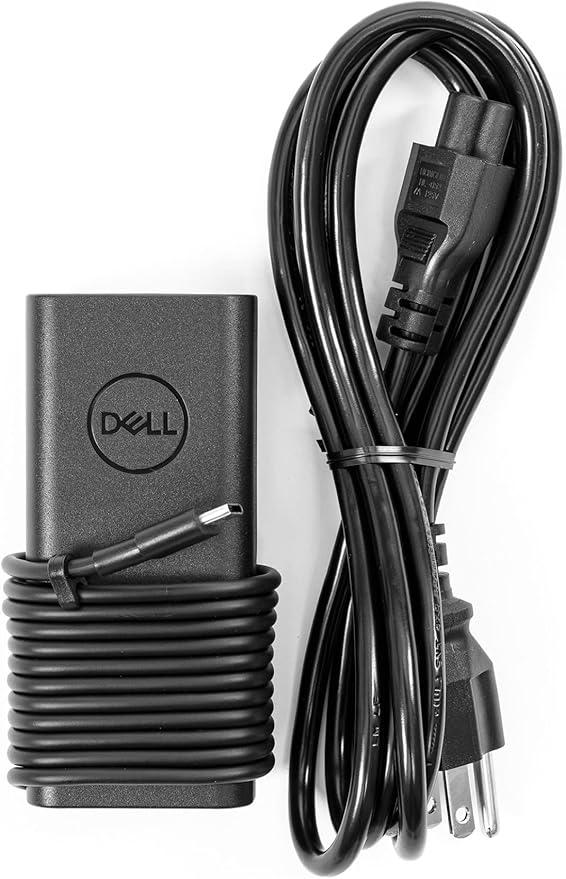
Introduction — Power That Keeps You Moving
A laptop charger should be invisible — it powers your work without drama. But when it fails, wobbles, or takes ages to refill a drained battery, it becomes the center of frustration. The Dell 65W USB-C charger promises dependable Power Delivery in a compact package, built to work seamlessly with modern XPS, Latitude and other USB-C compatible notebooks. In this review we test real-world charging behavior, compatibility across Dell models, heat and safety, portability, and whether it’s the best choice for daily carry or as a spare brick for travel.
Quick Verdict
The Dell 65W USB-C charger is a solid, well-built option for anyone who uses thin-and-light laptops that accept USB-C Power Delivery. It balances size, reliability and price: it’s compact enough for travel, supports fast charging for compatible Dell systems, and includes smart protections to keep your devices safe. For heavier 16-inch workstations or gaming rigs that need 90–140W, consider a higher-wattage brick — but for XPS 13/14, many Latitude models, and similar ultrabooks, the 65W charger is a practical everyday solution.
At-a-Glance Specifications
| Feature | Detail |
|---|---|
| Output | USB-C Power Delivery up to 65W |
| Ports | 1 × USB-C PD (some bundles may include an extra USB-A port or cable) |
| Compatibility | Dell XPS 13/14, many Latitude models, Inspiron ultrabooks and other USB-C PD laptops |
| Size & Weight | Compact, travel-friendly design |
| Protections | Over-voltage, over-current, short-circuit, thermal protection |
| Cable | Detachable USB-C cable or integrated cable depending on SKU |
| Use Case | Primary charger for light laptops; travel/spare charger for larger devices |
Design & Build Quality
Dell’s 65W charger follows a minimalist, durable aesthetic: matte finish, solid construction, and a compact profile that tucks easily into laptop bags. Plug design varies by region (foldable prongs on some SKUs), but overall the unit feels built to last. The single USB-C port keeps the design simple and focused on delivering maximum power to one device reliably.
Real-World Charging Performance
Charging Speed & Behavior
- Ultrabooks (XPS 13, compact Latitude): The charger negotiates full PD profiles and replenishes batteries quickly. For typical web browsing, document work, and media playback the charger sustains charge and often keeps the laptop at or near 100% during light use.
- Larger laptops (14″–15″ performance models): Most mid-range 14″ laptops charge well; however, under heavy sustained CPU/GPU load the device may draw more than 65W causing slower net charging or trickle charge behavior until the load reduces.
- 16″ workstations / gaming laptops: These usually require higher wattages; the 65W unit will charge but may not keep pace under heavy workloads. Use a higher-wattage or OEM brick for peak performance.
Phone & Tablet Top-Ups
Smartphones and tablets that support USB-C PD receive fast, reliable top-ups. The charger performs well as a multi-purpose travel brick for other devices when you don’t need simultaneous multi-device charging.
Thermal Performance
The charger becomes warm under sustained use (charging a drained laptop while under load). Temperatures are within safe limits thanks to internal thermal management — avoid covering the unit or placing it on soft surfaces while in heavy use to ensure optimal heat dissipation.
Compatibility Checklist — Will It Work With Your Dell?
- Works well for: XPS 13/14, many Latitude ultrabooks, Inspiron slim models, Chromebooks and other laptops that list USB-C PD 65W compatibility.
- Use cautiously for: High-performance 14″ laptops that require sustained >65W for peak loads. They will charge but may not reach maximum performance while plugged in.
- Not ideal for: 16″ workstations and gaming laptops that expect 90–240W OEM bricks for full power.
Tip: Always check your laptop’s required wattage in the official spec sheet before substituting chargers.
Setup & Best Practices
- Use the right cable: Pair the charger with a PD-rated USB-C cable capable of 65W or higher for reliable performance.
- Connect the charger first, then power on intensive apps: For faster top-ups, allow the charger to negotiate PD before launching heavy workloads.
- Avoid soft surfaces while charging: Keep the brick on a flat, ventilated surface to reduce heat buildup.
- Carry as a backup or travel brick: The 65W unit is compact enough to replace heavier OEM bricks on the go.
Safety & Reliability
Dell includes essential safety features: over-voltage protection, short-circuit protection, and thermal cutoffs. These reduce the risk of damaging the laptop or the charger itself. For long-term reliability, use Dell-certified or high-quality USB-C PD cables and avoid cheap knockoffs.
How It Compares — Dell 65W vs Alternatives
- Dell 65W vs Dell OEM 90W/130W bricks: The OEM higher-wattage chargers sustain full performance for heavy laptops. The 65W is smaller and more portable but less suited for peak-load scenarios.
- Dell 65W vs Third-party 65W GaN chargers: Some third-party GaN chargers are smaller and run cooler; choose trusted brands with good warranty support. Dell’s brick may integrate better with Dell systems and often includes tested compatibility.
- Dell 65W vs Multiport chargers: Multiport GaN chargers let you charge a laptop and phone simultaneously, but may split power between ports — check power distribution if you need full laptop wattage while charging other devices.
Pros & Cons
Pros
- Reliable Power Delivery for most ultrabooks and mid-range laptops.
- Compact, travel-friendly form factor.
- Dell-grade build and protection features.
- Simple single-port design reduces complexity.
Cons
- Not sufficient as the only charger for high-wattage workstations.
- Single port limits simultaneous charging unless you use a separate multiport adapter.
- Can become warm with sustained heavy charging — ventilation recommended.
Buyer’s Guide — Which Charger Should You Choose?
- If you own an XPS 13/14, many Latitude models, or a Chromebook: The Dell 65W is a great everyday and travel charger.
- If you use a 16″ workstation or a high-end gaming laptop: Buy a 90W–240W OEM or high-wattage third-party charger for full sustained performance.
- If you want to charge laptop + phone simultaneously: Look at multiport PD chargers that can deliver laptop wattage while topping up other devices.
- For travelers: Consider a GaN model for reduced size and weight, but ensure it’s a reputable brand with required PD wattage.
FAQs
Q: Will the Dell 65W charger damage my laptop?
No. USB-C Power Delivery negotiates the correct voltage and current. The charger supplies up to 65W and the laptop draws what it needs—no forced overcurrent.
Q: Can I use this charger with non-Dell laptops?
Yes — any laptop that supports USB-C PD will work, as long as its power requirement does not exceed 65W for sustained peak operation.
Q: Does it support fast-charging for phones?
Yes — PD-capable phones will fast-charge when connected to the charger.
Q: Why is my laptop still draining while plugged in?
Under heavy CPU/GPU load, some laptops draw more power than 65W; the charger may not keep up, causing the battery to slowly discharge while plugged in.
Q: Is a USB-C cable included?
Some SKUs bundle a cable; others do not. Confirm the product listing or include a high-quality PD cable in your purchase.
Q: How hot does it get during use?
It runs warm under sustained heavy charging. That’s normal — maintain airflow and avoid covering it during heavy use.
Final Verdict
For users of Dell XPS 13/14, many Latitude models, and similar USB-C PD ultrabooks, the Dell 65W USB-C charger is a dependable, compact option. It balances portability, safety, and sufficient power for everyday tasks. If your workload keeps your machine at maximum load for extended periods, upgrade to a higher-wattage OEM or a quality multiport GaN charger. For most professionals, students, and travelers who need a reliable spare or primary travel brick, the Dell 65W charger hits the sweet spot between convenience and performance.
Conversion-Optimized CTA — Compact Power, Trusted Reliability
Need a compact, dependable charger that keeps your Dell laptop powered on the road? The Dell 65W USB-C Charger combines certified compatibility, built-in protections, and travel-friendly size — perfect as your daily spare or go-anywhere charger.
Ready to simplify your setup? Check the latest price and get the Dell 65W USB-C charger today.
Disclosure: As an Amazon Associate, I earn from qualifying purchases.