
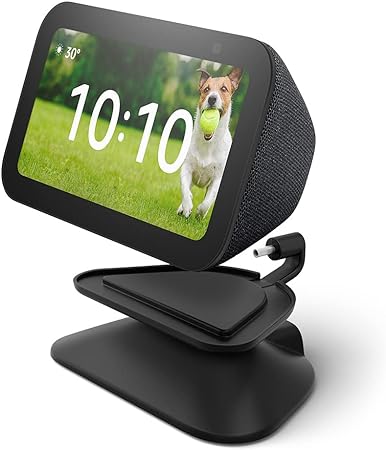
Introduction — Make your Echo Show 5 work harder without changing your setup
Small smart displays are only as useful as where you put them. The Echo Show 5 (3rd Gen) combined with the new adjustable stand and USB-C charging changes the game: no awkward cords, better tilt for video calls and bedside use, and a cleaner desk or nightstand footprint. If you want a compact smart display that looks intentional (not like an afterthought), this review walks through whether the 3rd-gen Show 5 plus the adjustable stand is the practical upgrade your home needs.
Quick verdict (TL;DR)
- Best for: Users who want a compact Alexa smart display with flexible placement and modern USB-C charging.
- Not for: Audiophiles who want premium speakers or users who need a large, primary kitchen display.
- Bottom line: The combination of the Echo Show 5 (3rd Gen) and the adjustable USB-C stand improves usability and placement flexibility — a small, high-impact upgrade for bedrooms, desks, and compact kitchens.
What’s new and why it matters
The 3rd-generation Echo Show 5 refines the classic small smart display with hardware and usability improvements. The adjustable stand adds tilt and cleaner cable management while switching to USB-C charging modernizes power delivery and simplifies travel and swaps. Together they make the Show 5 more versatile for video calls, bedside controls, and quick glance information like timers, weather, and notifications.
Who should consider this setup
- People who use the Echo Show 5 as a bedside alarm, kitchen helper, or desk companion.
- Households that want tidy cable management and a modern USB-C power option.
- Anyone who values better viewing angles for video calls or recipe reading.
Key specs (Echo Show 5 + Adjustable Stand)
| Item | Details |
|---|---|
| Display | 5.5-inch touchscreen |
| Resolution | Crisp for small-screen use (optimized for text & video calls) |
| Audio | Built-in speaker tuned for voice & casual music |
| Camera | Front-facing camera with privacy shutter (suitable for video calls) |
| Stand | Adjustable tilt, USB-C power passthrough, low-profile base |
| Charging | USB-C (stand supplies power) — easier replacement/portability |
| Connectivity | Wi-Fi, Bluetooth |
| Voice Assistant | Alexa (full Show features: routines, skills, video calls) |
| Best placements | Nightstand, desk, small kitchen counter |
Setup & first impressions
Setup is the same friendly Alexa experience: plug in, follow the on-screen prompts, connect to Wi-Fi, sign in with your Amazon account, and personalize. The adjustable stand simplifies power routing—USB-C cable runs through the stand giving a neat, low-profile look and letting you change the angle without unplugging.
Quick setup steps
- Attach the Show 5 to the stand (slide/clip depending on model).
- Connect the USB-C cable into the stand’s passthrough.
- Power on and complete the Alexa setup flow.
- Adjust tilt for optimal viewing and test camera framing for video calls.
Daily use: brightness, touch, voice, and camera
- Display & touch: The compact touchscreen is responsive and bright enough for close-up viewing. Text, timers, and recipes are easy to scan at a glance.
- Voice control: Alexa remains fast and accurate; the small speaker is tuned for voices so replies and notifications are clear.
- Camera & calls: The camera performs well for short video chats — the adjustable angle helps perfect framing for bedside or desk calls. The privacy shutter gives quick peace of mind.
- Power & portability: USB-C makes it easier to swap chargers and use standard power banks for short-term mobility.
Performance analysis — what to expect
- Responsiveness: Smooth UI, fast Alexa responses, and quick app launching.
- Media & music: Good for podcasts, news briefings, and casual music — not a substitute for a dedicated Bluetooth speaker for parties.
- Battery-free use: Since the Show 5 is a plugged device, the stand’s USB-C just improves convenience rather than enabling true portability.
- Nightstand mode: Adjustable tilt combined with bedside routines (alarms, morning briefings) is one of the most valuable use cases.
Comparison: Echo Show 5 (3rd Gen) with stand vs alternatives
- Vs Echo Show 5 without stand: The adjustable stand adds placement flexibility and cleaner cable routing, which improves daily usability.
- Vs larger Echo Shows (8/10): Larger displays are better for shared kitchens and media, but the Show 5 is more discreet and fits where space is limited.
- Vs tablet repurposing: A dedicated Echo Show is simpler to manage, integrates tightly with Alexa, and avoids accidental lock screens or app updates common on tablets.
Pros & Cons
Pros
- Adjustable viewing angle improves video calls and reading.
- USB-C charging modernizes power and simplifies replacements.
- Compact footprint fits small spaces like nightstands and desks.
- Seamless Alexa integration for routines, timers, and smart-home control.
Cons
- Small speaker limits music fidelity for larger rooms.
- No battery — still needs constant power, so placement near an outlet is required.
- If you want a large family display for recipes and video, a bigger Show is better.
Best use cases & routines
- Nightstand command center: Alarm, morning briefing, sleep sounds, quick calls.
- Desk companion: Calendar glance, voice notes, timers, and short video check-ins.
- Small kitchen display: Step-by-step recipe viewing, timers, and quick conversions.
- Entryway helper: Tilted to show doorbell camera feed and family reminders.
Pro tip: create a “Good Morning” routine that automatically shows calendar events, weather, and your commute — perfect for seeing it all on a small display first thing.
Installation & placement checklist
- Place near a reliable Wi-Fi signal and an outlet.
- Use the adjustable tilt to avoid glare from windows or overhead lights.
- Keep the camera at or slightly above eye level for best framing during video calls.
- Use the privacy shutter when not using the camera.
Buyer’s guide — which model or bundle to choose
- Choose the 3rd Gen Echo Show 5 with the adjustable stand if you value flexible placement and modern USB-C power.
- Pick a larger Echo Show if you want a family kitchen display or better speakers.
- If you already own a Show 5 (older gen), the stand and USB-C upgrade may be the most cost-effective way to extend usefulness without replacing the whole device.
Related internal links (inserted naturally)
For pairing the Show 5 with a compact tablet experience, see the Amazon Fire HD 10 Tablet Review for tips on media and family sharing.
If you’re building a connected home, the Amazon Smart Plug Review shows simple, high-impact devices that work great with an Echo Show as a control hub.
Explore more compact gadgets and smart accessories in our Tech Gadgets category.
Final verdict
The Echo Show 5 (3rd Gen) paired with the adjustable USB-C stand is a focused upgrade that addresses the real-world friction of placement and power. It won’t replace a full-size kitchen display or a dedicated smart speaker for audiophiles, but for bedrooms, desks, and small counters it’s a meaningful improvement. If you want a tidy, modern smart display that’s easier to place and use daily, this setup is a smart buy.
FAQs (SEO-friendly)
1. Does the Echo Show 5 (3rd Gen) work with the adjustable stand only?
No — the stand is optional. The Show 5 works on any flat surface, but the stand improves tilt and cable management.
2. Is the USB-C charger included with the stand?
Bundle contents vary by retailer. Check the product listing for included cables or chargers.
3. Can I mount the Show 5 on the wall?
The Show 5 is primarily designed for surfaces; wall mounting requires third-party mounts and careful cable routing.
4. Will the adjustable angle affect camera performance?
Yes — tilt the screen to frame video calls better or reduce glare. The camera’s field of view is fixed, so angling helps composition.
5. Is there a battery option for the Show 5?
The Echo Show 5 requires power; USB-C makes it easier to use portable power banks for short-term portability but does not provide built-in battery operation.
6. How do I protect privacy on the Show 5?
Use the integrated privacy shutter to physically block the camera and mute the microphone from device controls.
7. Can I use the Show 5 to display smart-camera feeds?
Yes — the Show 5 can show compatible smart-camera feeds and doorbell cameras via Alexa integrations.
8. Does it support Bluetooth audio output?
Yes — you can pair Bluetooth speakers or headphones for improved audio output.
9. Is the display bright enough for kitchen use?
The Show 5 is adequately bright for close counter use; in very bright kitchens a larger Show or tablet may perform better for visibility from across the room.
10. What’s the difference between the 3rd Gen and older Show 5 models?
The 3rd Gen focuses on better power options and optimizations; the adjustable stand adds practical placement improvements that older models lack.
Strong CTA (affiliate-optimized)
Want a smarter, tidier bedside or desk setup? The Echo Show 5 (3rd Gen) with the adjustable USB-C charging stand is an efficient, low-space way to add Alexa to small rooms. Upgrade your viewing angle, clean up cords, and make your smart display feel intentionally placed — check the latest bundles and offers to get the best value today.
Keywords
- Primary: Echo Show 5 (3rd Gen) Adjustable Stand review
- Secondary: Echo Show 5 accessories, USB-C charging stand for Echo, smart home nightstand setup, adjust Echo Show viewing angle