
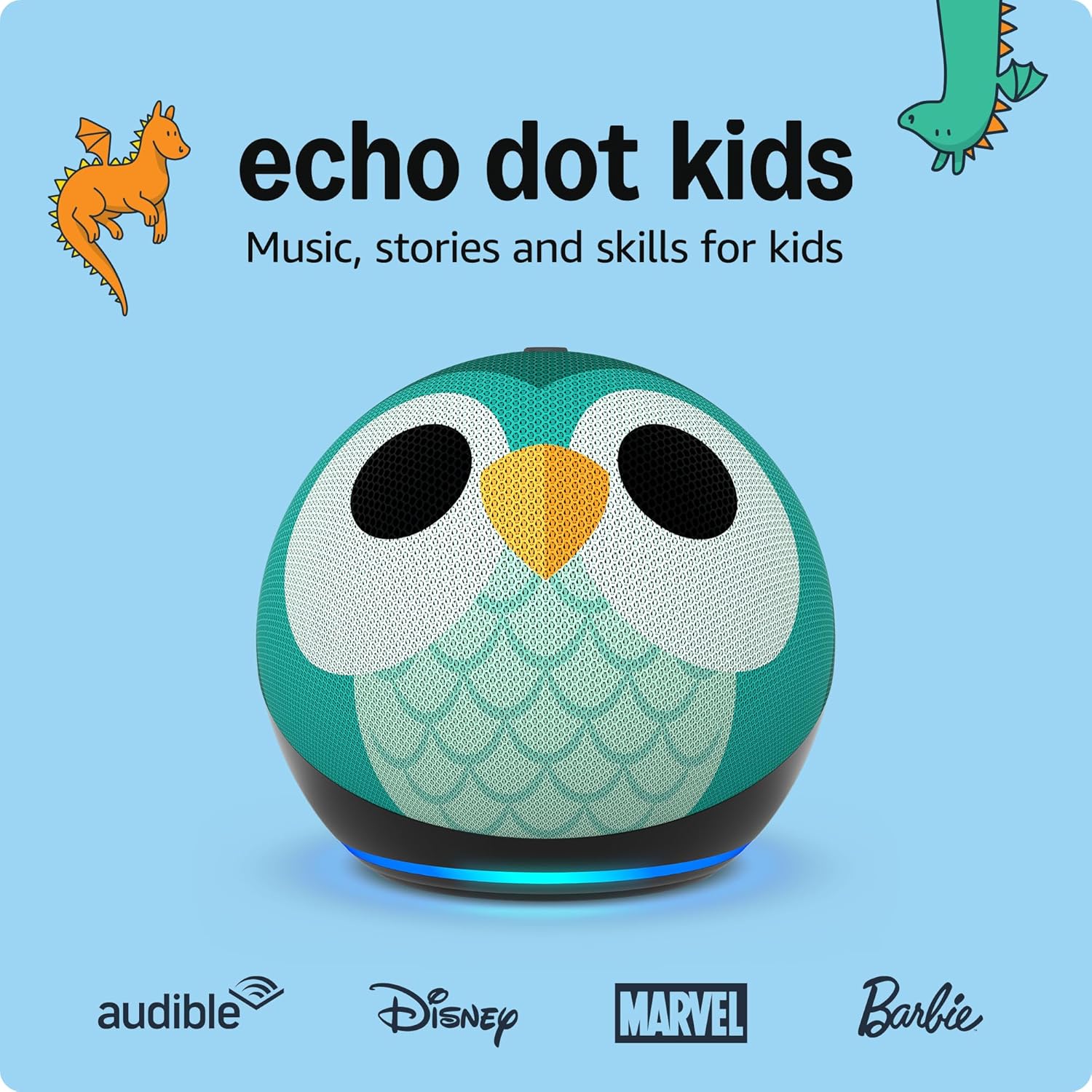
Introduction — Is this the kid-friendly speaker families will actually use?
Smart speakers are everywhere, but not all are built with children in mind. The Echo Dot Kids Owl Edition aims to bridge that gap: kid-friendly design, age-appropriate content, strong parental controls, and the same Alexa smarts parents already use. In this hands-on review we walk through what it actually does in daily family life, how safe and useful the kid features are, whether audio quality and durability meet expectations, and who should — and shouldn’t — buy it. By the time you finish reading, you’ll know whether the Owl is a helpful learning companion, a neat bedroom gadget, or just another plastic toy.
Quick verdict (TL;DR)
- Best for: Families with young children who want a safe, easy-to-manage smart speaker with educational content and simplified parental controls.
- Not for: Families who require deep privacy customizations, audiophiles who want premium sound, or homes that prefer Google or Apple ecosystems.
What is the Echo Dot Kids Owl Edition?
The Echo Dot Kids Owl Edition is a child-focused variant of the Echo Dot that pairs Alexa voice features with a whimsical owl design, curated kid content, and built-in parental controls. It offers the familiar Alexa voice assistant tailored for younger users: filtered skills and wake-word behavior, time limits and bed routines controlled by parents, and a package that usually includes a year of kid-friendly content and protections.
Key specs at a glance
| Feature | Details |
|---|---|
| Form factor | Small smart speaker with plush/soft-touch owl cover (design may vary) |
| Voice assistant | Alexa (kid-friendly experience) |
| Audio | 1.6″ speaker (improved for voice & casual music) |
| Connectivity | Wi-Fi (2.4/5 GHz), Bluetooth |
| Parental controls | Robust; time limits, content filters, communications controls |
| Subscription | Often bundled with a limited free trial of kid content service |
| Age target | Designed for kids 3–12 (best for 3–8) |
| Colors/variants | Fun owl-themed design with child-safe materials |
| Use cases | Bedtime stories, music for kids, homework Q&A, timers, simple routines |
What I tested
I evaluated daily use with kids (ages ~4–9) across bedroom, playroom, and shared family scenarios: voice interactions, content limits, bedtime routines, audio playback (music and stories), and parental controls via the Alexa app. Observations include responsiveness, content appropriateness, and durability in real-world family use.
Setup: fast, kid-safe, and parent-friendly
Setup follows the familiar Alexa flow but adds child-account steps:
- Plug the Owl and power it up.
- Open the Alexa app and add a new device → choose Echo Dot Kids Edition (or similar).
- Create or link a child profile under your Amazon Household and assign the Owl to that child’s account.
- Configure parental controls: daily time limits, bedtime hours, allowed features (music, calls, skills).
- Personalize with a fun name and enable kid-friendly routines or skills.
Setup is deliberately simple so parents can have control within minutes while kids can begin using it immediately.
Daily performance & usability
- Responsiveness: Alexa responds quickly to wake words and child voice queries. Voice recognition works well for short requests; very soft or mumbled commands occasionally need repetition.
- Audio quality: Tuned for voices and children’s music. Not hi-fi, but perfectly adequate for stories and nursery songs. Expect thin bass on deeper tracks.
- Content controls: Parents can block explicit music, limit skill access, and set quiet hours — these tools are straightforward in the Alexa app.
- Durability: The Owl’s child-friendly exterior handles normal play well but isn’t indestructible — treat it as delicate electronics, not a chew toy.
- Privacy & safety: The device includes mute and mic controls, and voice recordings are manageable through the parent account.
Overall, the Owl balances fun and control: it’s built for kids to use while giving parents essential oversight.
Parental controls: how safe is it?
This is where the device shines. Controls typically include:
- Daily time limits and bedtimes.
- Content filters for music and skills.
- Explicit filter toggles and restricted access to shopping and some voice skills.
- Kid-to-family communication is limited and manageable through permissions.
These controls reduce accidental purchases and help keep screen/speaker time reasonable, which is a major win for busy parents.
Audio & content: perfect for stories and songs
The speaker delivers clear speech for stories and educational content; music playback for children’s playlists is engaging and bright. For family dance parties or high-fidelity listening, parents should consider a larger Echo variant or a dedicated Bluetooth speaker.
Included kid subscriptions (when bundled) add story libraries, games, and curated music that are age-appropriate. That makes the unit more valuable to families who want immediate, safe content without extra configuration.
Comparisons: Owl Edition vs Echo Dot (standard) vs Kids Alternatives
- Echo Dot (standard): Better audio at similar size in some newer Dot models, but lacks kid-specific content and parental controls. Choose standard Dot for general adult use.
- Other Kid Speakers: Some competitors offer similar controls, but the Owl’s combination of content, brand ecosystem, and easy parental tools often makes it the most turnkey kids’ option.
- Higher-end speakers: If audio quality is your top priority for the whole family, consider an Echo with a larger driver — but you’ll lose built-in kid protections.
Pros & Cons
Pros
- Made for kids: design, content, and controls.
- Strong parental controls and easy app management.
- Engaging kid-focused content out of the box.
- Lightweight, friendly design kids like.
Cons
- Audio is modest — best for speech and kids’ music, not hi-fi listening.
- Tied to the Alexa/Amazon ecosystem.
- Not a toy replacement — keep it handled with care.
- May require a subscription after trial for full content access.
Buyer’s guide — what to consider before buying
- Age of child: Best for preschool and elementary-aged kids (approx. 3–10). Teens may outgrow the simplified experience.
- Ecosystem: Works best if your household already uses Alexa or Amazon services.
- Content needs: If you want a huge library of stories and ad-free content, check whether the subscription costs suit your budget.
- Audio expectations: If music fidelity matters, budget for a higher-end Echo or a paired Bluetooth speaker.
- Durability: If the device will be handled roughly, add a safe storage routine or keep it on a high shelf when not in use.
How to use it: 8 practical ideas
- Bedtime stories: Schedule a nightly story routine for wind-down time.
- Morning wake-up: Gentle music + weather and a friendly greeting.
- Homework helper: Quick facts, math practice, spelling help.
- Timers for tasks: Use countdowns for chores or screen time.
- Custom routines: Chain “brush teeth” reminders, lullabies, and bedtime lights.
- Family questions: Safe, supervised curiosity — ask Alexa simple “how” and “why” questions.
- Language practice: Use kid-friendly language skills for early learning.
- Party mode: Play children’s party playlists for small celebrations.
Related internal links (inserted naturally)
If you want more ways to create a kid-friendly smart home, check out our Amazon Fire HD 10 Tablet Review, which pairs well for supervised video and learning apps.
For a smart speaker that works in the car and adds voice control on the go, see our Amazon Echo Auto Review.
Explore more family tech ideas in the Tech Gadgets category and find household smart upgrades in Home & Kitchen category.
Final verdict
The Echo Dot Kids Owl Edition is an outstanding entry-level smart speaker for families. It combines charming design, strong parental controls, and releasable kid content into a compact, affordable package. If your household uses Alexa and you want a safe, simple way to introduce children to voice tech, this is one of the best options available. If you need top-tier audio or strict cross-platform compatibility, consider alternatives — but for most families, the Owl Edition strikes the right balance of fun, safety, and usefulness.
FAQs (SEO-friendly)
1. What ages is the Echo Dot Kids Owl Edition best for?
Designed for younger children, it’s ideal for ages 3–10; older kids may prefer a standard smart speaker.
2. Does it include parental controls?
Yes. Parents can set time limits, bedtimes, and filter content from the Alexa app.
3. Is the Owl Edition louder or better sounding than a regular Echo Dot?
Audio is tuned for speech and kids’ music. It’s clear for stories but not as full-bodied as higher-end speakers.
4. Can my child make calls with it?
Family calling features can be enabled or restricted by parents; permissions are controlled through the parent account.
5. Do I need a subscription for story and content libraries?
Many units ship with a trial of kid content; continued access may require a subscription depending on the offer.
6. Is it safe for my child’s privacy?
The device includes mic mute and parental dashboard controls; parents can review and delete voice recordings via account settings.
7. Can I pair it with other smart home devices?
Yes — it works like other Echo devices for basic smart home control, but the child profile limits apply per parental settings.
8. Will it work with Google Assistant or Siri?
No. It’s part of the Alexa ecosystem and does not natively support Google or Apple voice assistants.
9. Is the owl cover washable?
Check the product manual; covers are generally designed for light cleaning but not full machine washing.
10. Where should I place the speaker in my home?
Place it on a stable surface in the child’s room or play area where it’s within reach for voice commands but not at risk of spills or heavy handling.
Strong CTA (affiliate-optimized)
Bring safe voice tech into your child’s day with a smart speaker built for families. If you want a friendly, easy-to-manage smart speaker that kids actually enjoy, consider the Echo Dot Kids Owl Edition — set it up in minutes, control it from your phone, and add kid-friendly content that makes learning and playtime easier.
Ready to buy? Check the latest offers and bundles to get the best value and content trial for your family.
Amazon Echo Dot Kids review, Echo Dot 5th Gen Owl, smart speaker for kids, Alexa parental controls, Amazon Kids+ subscription, safe tech for kids, screen-free entertainment.