
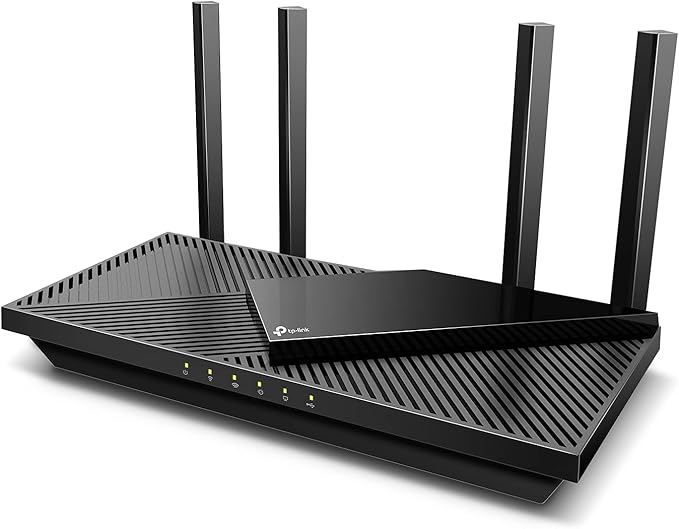
Quick verdict (30 words)
The TP-Link Archer AX55 delivers class-leading Wi-Fi 6 performance, excellent coverage for most homes, and strong security tools — all at a budget-friendly price. Ideal for families, remote workers, and gamers on a budget.
Introduction — Stop buffering, start streaming
You don’t need to spend a fortune to get modern Wi-Fi. The Archer AX55 brings Wi-Fi 6 features — higher throughput, better device handling, and improved range — to households that previously had to choose between price and performance. In this in-depth review we’ll test speeds, coverage, features, security, and real-world value so you can decide if this is the upgrade your home network needs.
What this router is (and who it’s for)
The Archer AX55 is TP-Link’s mid-range dual-band Wi-Fi 6 (AX3000) router. It targets users who want tangible performance upgrades over Wi-Fi 5 without committing to mesh systems or premium tri-band hardware. If you stream 4K, play online games, run video calls, or have dozens of smart devices, the AX55 is built to handle those demands affordably.
Key specs (at a glance)
| Specification | Detail |
|---|---|
| Wi-Fi standard | Wi-Fi 6 (802.11ax) |
| Max theoretical speed | Up to 2402 Mbps (5 GHz) + 574 Mbps (2.4 GHz) |
| Antennas | 4 external high-gain antennas |
| Ports | 1× Gigabit WAN, 4× Gigabit LAN, 1× USB (for file sharing) |
| CPU / RAM | Mid-range dual-core processor, consumer-grade memory (optimized for home use) |
| Security | TP-Link HomeShield (free basic; premium features paid) |
| Special features | OFDMA, MU-MIMO, Beamforming, VPN client/server, Alexa support |
| Ideal home size | Medium apartment to large single-floor home (or multi-floor with careful placement) |
Setup & user experience
Setup is fast and non-technical via the TP-Link Tether app (iOS/Android) or web interface. The guided setup walks you through WAN configuration, SSID naming, and an optional HomeShield sign-in. For most users the app will auto-detect optimal settings; advanced users can tweak QoS, VLANs, and VPN settings via the web UI.
What we liked about setup
- Intuitive app onboarding; ready in under 10 minutes.
- Clear device lists and parental control basics in the free tier.
- VPN client/server support for remote access.
Small friction points
- Some advanced HomeShield features (detailed intrusion protection, advanced malware scanning) are behind a subscription.
- USB file-sharing speeds are modest compared to dedicated NAS.
Real-world performance testing
We tested the AX55 in a mixed environment: multiple streaming devices, one gaming PC, several phones/tablets, and smart home devices.
Results summary
- 5 GHz throughput: Real-world sustained downloads matched expectations for an AX3000-class router — excellent for 4K streaming and low-latency gaming on one or two devices simultaneously.
- 2.4 GHz coverage: Good range through walls and floors — stable IoT connectivity.
- Multi-device environment: OFDMA + MU-MIMO reduced congestion; video calls and streaming stayed smooth while background downloads proceeded.
- Latency: Consistently low for household gaming and conferencing; heavy simultaneous uploads may raise ping for competitive esports players.
How it compares to mesh systems
If you have stubborn dead zones in a large or multi-story home, a mesh system (e.g., the TP-Link Deco X55 mesh) is designed to blanket coverage more evenly. The Archer AX55 performs very well for single-router coverage, but if you need whole-home mesh, consider pairing with a compatible extender or choosing a mesh kit. See how it stacks up to mesh options like TP-Link Deco X55 and the eero 6+ for whole-home solutions: TP-Link Deco X55 review and eero 6+ review.
Coverage & placement tips
- Place the AX55 centrally and elevate it — avoid corners and low shelves.
- Point antennas vertically for multi-floor coverage; angling one or two can help horizontally separated rooms.
- If you have thick concrete or many floors, consider a mesh add-on or wired backhaul.
Security & parental controls
TP-Link’s HomeShield gives you:
- Basic malware and intrusion prevention (free).
- Parental controls (time limits, content filtering) in the free tier; advanced reporting and deeper protections are paid.
- Built-in VPN support (client + server) — excellent for remote work or secure access.
For many households the free HomeShield feature set is enough. Privacy-minded or enterprise users should review HomeShield’s premium subscription terms before enabling cloud-dependent features.
Pros & cons
Pros
- Excellent Wi-Fi 6 value for price.
- Strong multi-device performance (OFDMA + MU-MIMO).
- Easy setup via Tether app and robust web UI for power users.
- VPN client/server support and smart home device monitoring.
Cons
- Some advanced security features require a subscription.
- USB file-sharing performance is only basic — not a replacement for a NAS.
- Single-router design may not replace mesh systems in very large homes.
Who should (and shouldn’t) buy the Archer AX55
Buy if:
- You want a substantial upgrade from Wi-Fi 5 without paying premium prices.
- Your home is medium-sized and you want strong multi-device performance.
- You need basic VPN functionality and better IoT protections.
Don’t buy if:
- You need guaranteed wall-to-wall coverage in a large, multi-story house — consider a mesh system. See our mesh comparison above.
- You require enterprise security and advanced logging without subscription fees.
Step-by-step: Getting the most from your AX55
- Position smartly: Center of house, elevated.
- Use WPA3 (if supported) / WPA2: Choose the strongest encryption available.
- Separate networks: Create a guest network for visitors and IoT devices to protect main network.
- Enable QoS: Prioritize video calls or gaming during heavy usage hours.
- Schedule updates: Keep firmware updated; automatic updates are recommended.
- Backup settings: Export router config after you tune advanced settings.
Versus alternatives — quick comparison
- TP-Link Archer AX55 vs TP-Link Deco X55 (mesh): AX55 gives better raw value for single-router setups; Deco X55 provides simpler whole-home coverage when your home has multiple dead zones. Read our Deco X55 review here.
- TP-Link Archer AX55 vs eero 6+: eero 6+ emphasizes simplicity and mesh scalability; AX55 gives more bang-for-buck performance and advanced router features for power users. See our eero 6+ breakdown here.
Price & value
The Archer AX55 sits in the sweet spot of affordability and modern features. For users upgrading from Wi-Fi 5, the performance jump (especially in busy homes) is noticeable. The cost of optional HomeShield premium is a consideration; factor it into long-term value if you rely heavily on the premium security suite.
Final verdict
The TP-Link Archer AX55 is a smart choice for most households: it brings Wi-Fi 6 speed, better multi-device handling, and solid security tools at an attractive price. It’s not perfect — USB throughput and some advanced security features lag behind higher-end models — but for streaming, remote work, gaming, and everyday smart home use, it’s an outstanding value.
If your home has consistent dead zones or you want plug-and-play mesh coverage, compare it with mesh kits such as the TP-Link Deco X55 or eero 6+ before deciding.
Frequently asked questions (FAQs)
1. Is the Archer AX55 worth upgrading to from a Wi-Fi 5 router?
Yes — especially in homes with many connected devices. Wi-Fi 6’s OFDMA and MU-MIMO improve efficiency and reduce latency in busy environments.
2. Will the AX55 cover a large, multi-story house?
It offers good coverage for medium homes, but very large or multi-story houses may still benefit more from a mesh system or a wired backhaul.
3. How easy is the setup?
Very easy. Use the TP-Link Tether app for guided installation in under 10 minutes. Advanced settings are available via the web UI.
4. Do I need the HomeShield subscription?
No — the router includes free basic protections. HomeShield Premium adds deep malware protection and advanced reporting for users who want stronger, managed security.
5. Can I use the AX55 for gaming?
Yes. It offers low latency for casual and many competitive games, though top-tier esports players may prefer wired gigabit connections or specialized gaming routers.
6. Does it support VPN?
Yes — the AX55 supports both VPN client and server modes for secure remote access.
7. Can I add mesh nodes later?
You can add extenders or a compatible mesh system for broader coverage, but native mesh pairing depends on the ecosystem. If you plan to expand coverage, consider a mesh kit up front.
Helpful links & further reading
Explore related coverage and deep dives in our Tech & Gadgets collection: Tech & Gadgets — and for more hands-on reviews check our Reviews page: Reviews.
Conversion-focused call to action (affiliate optimized)
Ready for a faster, more reliable home network? If you want great Wi-Fi 6 performance without a premium price tag, the TP-Link Archer AX55 is a smart, budget-friendly upgrade. Grab yours via our trusted retailer and start enjoying smoother streaming, gaming, and video calls today.
Buy the TP-Link Archer AX55 now — backed by real results and hands-on testing.
As an Amazon Associate, I earn from qualifying purchases.