
Amazon Fire HD 8 Kids Tablet (2024) — Updated Review, Specs & Buyer’s Guide
The Amazon Fire HD 8 Kids (2024) is built for preschoolers: durable, easy to manage, and stocked with curated learning content. In this hands-on review we break down what’s new, real-world performance, who should buy it, and how to configure it for the best results.
Quick TL;DR — What you need to know
The Amazon Fire HD 8 Kids Tablet (2024) focuses on safety, durability, and a curated content experience for ages 3–7. It pairs an 8″ HD display with 3 GB RAM, expandable storage up to 1 TB, and Amazon’s parental controls for an affordable, family-friendly tablet experience.
Updated short verdict
If you want a rugged, low-friction tablet that reduces screen-time debates and survives everyday drops, the Fire HD 8 Kids (2024) is one of the best value options. Ideal for early readers and preschoolers; not the best choice if you need advanced apps or a device that grows with older kids.
What’s new in the 2024 model
- 3 GB RAM for smoother app launches and multitasking vs older kids models.
- Improved Parent Dashboard with remote management from your phone.
- Expanded microSD support up to 1 TB for large offline libraries.
- Battery life extended to roughly 12–13 hours in mixed use.
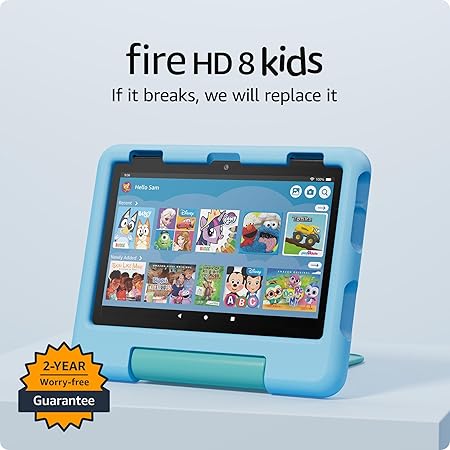
- 2-year Worry-Free Guarantee for replacement if the tablet breaks.
Design & Build
The tablet ships with a bright, rubberized kid-proof case that improves grip and survivability. The 8″ HD display is sized for small hands and the case doubles as a stand for hands-free viewing. Lightweight and simple button layout make it easy for younger kids to use independently.
Display & Audio
8.0″ HD (1280×800) with durable glass. Dual speakers handle streaming and storytime — volume limits are configurable via parental settings. The display is optimized for indoor viewing; direct sunlight will reduce perceived contrast as with most devices in this price class.
Performance & Battery
With 3 GB RAM and a refreshed Fire-optimized chipset, day-to-day performance (apps, interactive books, streaming) feels snappy for the target age group. Heavy multitasking or demanding Android games are not the intent here.
Battery: Expect around 10–13 hours of mixed usage (videos + reading + apps), sufficient for travel or long outings.
Software & Parental Controls
Amazon Kids provides curated, ad-free content and strong parental controls. Use the Parent Dashboard to set time limits, approve apps, create learning goals, and schedule downtime. The trade-off: Fire OS is more closed than stock Android, which limits some app choices.
Storage & Expandability
Base storage is typically 32 GB, expandable via microSD up to 1 TB — ideal for offline video downloads and large learning packs.
Camera & Sensors
Front and rear cameras are basic but fine for selfies and video calls. Not intended as a photography device.
Specifications (At-a-glance)
| Feature | Amazon Fire HD 8 Kids (2024) |
|---|---|
| Display | 8.0″ HD (1280×800) |
| Processor | Updated quad-core (Fire-optimized) |
| RAM | 3 GB |
| Storage | 32 GB (expandable via microSD up to 1 TB) |
| Battery | Up to ~13 hours (mixed use) |
| OS | Fire OS (Amazon) |
| Parental Controls | Amazon Kids + Parent Dashboard |
| Warranty | 2-year Worry-Free Guarantee |
| Target Age | 3–7 years |
Real-world performance & user experience
Parents report fewer lags and smoother streaming compared to earlier kids models. The included case and 2-year replacement guarantee reduce buyer anxiety about accidental damage. The curated content and parental controls make it easy to avoid unsuitable suggestions or ads.
Pros & Cons
Pros
- Excellent parental controls and remote management
- Durable case + 2-year replacement guarantee
- Strong battery life for family use
- Amazon Kids+ content ecosystem (books, videos, learning apps)
- Expandable storage up to 1 TB
Cons
- Fire OS has a smaller app selection than Android/iOS
- Subscription auto-renewal for Kids+ can surprise buyers
- Screen resolution is modest vs premium tablets
- Limited compatibility with some Google Play apps
Who should buy it?
Ideal for parents of preschool and early elementary kids (3–7) who want a safe, durable, and easy-to-manage tablet. If you need wider app compatibility or a device that will serve older kids, consider a larger Fire HD model or an Android/iPadOS tablet.
How to set it up — Quick starter guide
- Charge the tablet and connect to Wi‑Fi; sign in with your Amazon account.
- Create a child profile inside Amazon Kids and set the age range.
- Add educational apps, set learning goals, and configure screen-time rules.
- Enable Parent Dashboard on your phone for remote control and monitoring.
- Insert a microSD card for expanded offline storage (optional).
Comparison: Fire HD 8 Kids (2024) vs other Fire models
For direct comparisons, see our related reviews linked below:
Alternatives to consider
- Android tablets with Google Play for broader app access.
- Apple iPad for premium apps and longevity (more expensive).
- Lower-cost Fire 7 Kids for toddlers who need a smaller, cheaper device.
Buying checklist
- Choose based on child’s age: 3–7 → Fire HD 8 Kids; 0–3 → Fire 7 Kids; 8+ → Fire HD 10 or other.
- Plan storage needs — buy a microSD card if you’ll download many videos.
- Decide whether to keep Amazon Kids+ after the trial to avoid recurring charges.
- Keep the Worry-Free Guarantee as it adds true peace of mind for accidental damage.
Conversion-optimized CTA
Ready to give your child a tablet that’s built for learning and tough enough for real life? Check current prices & offers
FAQs
- Is the Fire HD 8 Kids Tablet (2024) good for learning apps?
- Yes — it’s optimized for kids’ educational apps included in Amazon Kids+, and the Parent Dashboard helps reinforce learning goals.
- How long does the battery last under real use?
- Expect roughly 10–13 hours of mixed usage (video, apps, reading) depending on settings.
- Can I install Google Play apps on the Fire Kids tablet?
- Fire OS doesn’t natively include Google Play. You can sideload some apps, but compatibility and updates aren’t guaranteed.
- What ages is this tablet best for?
- Best for ages 3–7 — tailored to preschoolers and early readers.
- Does the tablet come with a warranty?
- Yes — Amazon includes a 2-year Worry-Free Guarantee that lets you replace the device if it breaks.
- Is Amazon Kids+ required?
- No — Amazon Kids+ is optional. The tablet functions without the subscription, but Kids+ adds curated, ad-free content and learning packs.
- Can multiple children have profiles?
- Yes — you can create multiple child profiles with bespoke settings and content.
- Is there a blue-light filter or bedtime features?
- Amazon Kids allows scheduling and downtime features to limit screen use at night, and you can set reading goals and quiet hours.
- Should I buy the Fire HD 8 Kids or upgrade to Fire HD 10?
- Choose Fire HD 8 Kids for durability, simplicity, and younger children. Choose Fire HD 10 if you need a larger screen, more power, and a device that can grow with an older child.